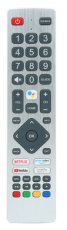

Sharp LC-60N6200U replacement remote control with microphone.

Pairing the remote control is done by pressing the HOME button and the < (left) arrow together for about 5 seconds. Replacement remote control with microphone function for example for Sharp TV LC-60N6200U LC-60N7000U LC-65N7000U LC-43N7000U LC-50N7000U LC-55N7000U LC-40N5000U LC-43N5000U LC-43N6100U LC-43N7000U LC-50N5000U LC-50N6000U LC-50N7000U LC-55N620CU LC-55N5300U LC-55N6000U LC-55N7000U LC-60N5100U LC-60N6200U LC-60N7000U LC-65N5200U LC-65N6200U 65N7000U LC-65N9000U *LC-75N620U LC-75N8000U LC40N5000U LC43N5000U LC43N6100U LC43N7000U LC50N5000U LC50N6000U LC50N7000U LC55N620U LC55N5300U LC55N6000U LC55N7000U LC60N5100U LC60N6200U LC60N7000U LC65N5200U LC65N6200U LC65N7000U LC65N9000U LC75N620U LC75N8000U and more. More
Modern replacement remote control for Sharp TVs with advanced features. Equipped with a built-in microphone for voice search, allowing you to control your TV easily using voice commands.
The remote works with models such as:
LC-60N6200U, LC-60N7000U, LC-65N7000U, LC-43N7000U, LC-50N7000U, LC-55N7000U, LC-40N5000U, LC-43N5000U, LC-43N6100U, LC-50N5000U, LC-50N6000U, LC-55N620CU, LC-55N5300U, LC-55N6000U, LC-60N5100U, LC-65N5200U, LC-65N6200U, LC-65N9000U, LC-75N620U, LC-75N8000U
Remote control benefits:
-
Built-in microphone for voice control
-
Easy pairing – press and hold HOME and left arrow for 5 seconds
-
Immediate operation after pairing
-
Advanced Smart TV control
-
Ergonomic design for comfortable use
If the TV does not respond to pairing:
Enter the TV menu - remote & accessories settings
press OK and then HOME and the < (left) arrow together. approx. 5 sec.