
Sony RMF-TX611E original remote control - backlit
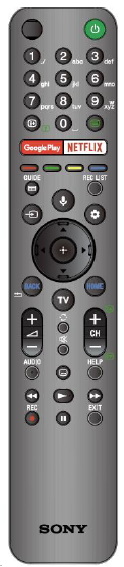
Foe example for: KD49XH9505BU, KD-43XH8505BU, KD43XH9106, KD-49XH8505BU, KD-49XH9096, KE85XH9096BAEP, KD-85XH9096,FW-55BZ40H, FW-65BZ40H, FW-75BZ40H, FW-55BZ40H, kd-49xh8077, KD-49XH8577, KD-49XH8596, KD-65XH9096, KD-49XH9096, KD-55A8b, 49XH9196, KD-55A8, KD-55A85, KD-55A87, KD-55A89, KD43X8000H, KD49X8000H, KD55A8H, KD55X8000H, KD55X8500G, KD55X9500G, KD65A8H, KD65X8000H, KD65X8500G, KD65X9500G, KD75X8000H, KD75X8500G, KD75X9500G, KD85X8000H, KD85X8500G, KD85X9500G.
If you have a backlit remote
Backlit remote:
Press and hold the (Volume) - button and the HOME button on the remote simultaneously for 2 seconds.
Release them when the MIC LED on the remote flashes twice.
To turn the backlight on the remote again, do the same
Pairing
Turn on the TV
Press and hold the VOL- and MIC buttons together. Hold for at least 2 seconds. This will initiate the pairing process.
The remote is ready to use